Showing posts with label trick. Show all posts

Tumblr Tricks you must now! - Part #2


Hello Everyone! Here's a few tricks for Tumblr that you must know! If you miss part #1 - no worries. Click HERE.  Now you can show your friends how make Tumblr even more easy. Hope you enjoy it!

Did you know you're never lost in Tumblr? There's a help button on your Dashboard that allows you to visit the "Help Center"
 
(the help button)

Did you know you can Queue your posts?  Did you miss a day of Log in on Tumblr? No stress! Queue in Tumblr your photos, text, quotes, audio, links or videos. Want to learn how -- click HERE.

• Did you know that you can put your blog into "Energy Saving Mode"? Energy Saving Mode will help conserve energy while people are on your blog but are not browsing. How does it work? Click HERE to find out!

• Have you try the tool BEST OF TUMBLR? The Best of Tumblr tool grabs all your posts and sorts them by popularity, grouped by year and month.  It can take a few minutes to load everything if you’re a prolific blogger, but the result is a pretty, reverse-calendar of your tumblr.  The most popular post is featured first, with three runner-ups that you can reveal by hovering over them. 

(click on the photo to visit the tool!)
If you’d like to generate your own “Best of Tumblr 2011” collage like my New Years post, you can do so here. The Best of Tumblr tool grabs all your posts and sorts them by popularity, grouped by year and month.  It can take a few minutes to load everything if you’re a prolific blogger, but the result is a pretty, reverse-calendar of your tumblr.  The most popular post is featured first, with three runner-ups that you can reveal by hovering over them. Please note: This tool does not show posts that you reblogged, only your own photos. Enjoy! Updated 1/2/2012: Added “Advanced Options” to let people see popular posts from 2012 or non-photo posts Sped-up loading Fixed the “Ghost Reblogs” bug. If you reblogged someone who later deleted their account, tumblr turns the post into a normal post, not a reblog…so it was messing up stats. Fixed a bug where the tool gives up when tumblr gives a 500 error.


Fun tricks and tips: Fish for you blog!

When I first saw this cool animation I was like: How cool is that? How can you add this lovely fish in your blog? Is perfect for those who want to give a relax mood to their blog, or for those who have Inspiration Photography Blogs. But the Question is "How can I get them?" Easy let me show you!


Tutorial: Fish Pond for your Tumblr Blog
First let me annouced that this tutorial is from http://abowman.com awesome gadgets. Visit their website for more cool tricks and gadgets. Tumblog-it! doesn't take any credit for this HTML code.

1. Now let's start! First you must Copy the HTML code in the website HERE.
(Copy the first one like the example below)


2. Log into your Tumblr Account.
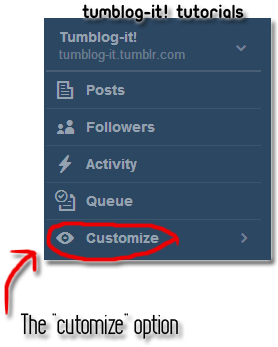
3. Find the Blog Settings and Customize Theme.
(If you don't know how to find the Customize theme you can visit our TUTORIAL)


4. Now that you found Customize Theme option, click on EDIT HTML and Paste the code wherever you want to have the lovely fish pond. You can also Added on the Description Option. 

5. Click Update Preview to see how the pond look like, you can always change it to top, down or side bar. If you like how it looks like click on SAVE then CLOSE. Visit your blog and enjoy the fish pond!


Tutorial: How to Add a Search Box on your Tumblr Blog

Here's a quick tutorial of how to add a Search Box for your Tags. Is quick easy and fun. Here's how the Search Box looks like:


Note: You can change the "Find" word with: search, Find me, what your looking for?, etc.


1. Let's start. COPY the following code, and PASTE it between the tags <head>  and </head>.


2. Now COPY this code - and PASTE wherever you want to have the Search Box. 


[coding courtesy of: tutorials.schmigs.com]


Fun tricks and tips: Rainbow Text

Welcome to Tumblr! This is an example text of how to make a Rainbow Text! Welcome to Tumblog-it! the perfect place to find tutorials, tricks, plugins and much more for you Tumblr blog! Learn to Tumblr the Easy-way!


Fun tricks and tips: Rainbow Text

1. Let's start by going to THIS website.
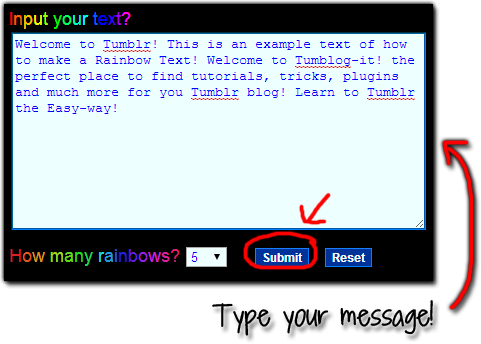
2. Now choose your text. And the rainbows you want to have. From 1-10
3. Then click on the SUBMIT button.


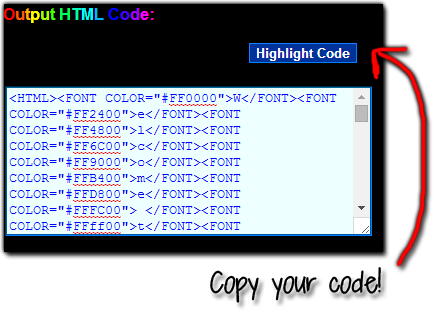
4. Now on the right side of the website, find your HTML and copy it.


5. Go to your Tumblr Blog Dashboard - Customize Theme - Edit HTML.
Don't know how to find the Customize Option? Click HERE! for the tutorial.

6. Paste your code where you want to show your text. Click on Update Preview to see how it looks. If you like it click SAVE then CLOSE. And you're finish!


How to know the date and time of each post?

Hello everyone! Here's a quick and fun tips that most Tumblr Bloggers don't know. Now you can teach others if they ask you "where's the date of this post?" . If you want to know when the post (reblog or not) was made: it's easy! 

• Find the right-upper corner of a post, and you see those little tabs when you hover over them? It reveals the date and time the post was published. Easy right? Happy Blogging!

Here's the Example: