Showing posts with label fun. Show all posts

Falling Petals Effect for your Tumblr Blog


While navigating on Tumblr I found a code that makes your Tumblr blog have "falling petals".  If you wish to see a preview of it, I add the effect on My Example Blog. Take a look, if you like how it looks here's the tutorial:

1. Copy the from this page. CODE
2. Go to Settings, and open the Customize panel.
→ Settings → Customize → Edit Html


3.  Paste the code before or after the code <head> CODE HERE </head>
→ Use Control + F to find the code → Paste the code

4. Click on Update Preview and the falling petals should appear.
→ Update Preview → Save → then close your Customize Panel


[code found at HERE]

Tutorial: “You’ve been here __ times”


Hello Everyone! This is a quick tutorial of How to add the "You've been here ___ times". Enjoy!

Step 1: Copy the following code:


Step 2:
Go to your Tumblr Account.

Step 3: Customize your theme.
(Tutorial: Where is the “Customize Theme” Option?)

Step 4: Edit HTML and Paste the code where you want to have it.

Step 5: Click on "Update Preview" and if you like it click on "Save" then "Close". You're finish!

[special thanks to: Camila for the code]

Wallpapers for your Christmas Spirit!

Merry Christmas everyone! I hope you have enjoy yesterday (christmas day) with all your family and friends. Here's some Christmas Wallpapers that will look perfect on your desktop. Tumblog-it! doesn't take any credit for this wallpapers, click on the photo to enlarge it! 


Tumblr Tricks you must now! - Part #2


Hello Everyone! Here's a few tricks for Tumblr that you must know! If you miss part #1 - no worries. Click HERE.  Now you can show your friends how make Tumblr even more easy. Hope you enjoy it!

Did you know you're never lost in Tumblr? There's a help button on your Dashboard that allows you to visit the "Help Center"
 
(the help button)

Did you know you can Queue your posts?  Did you miss a day of Log in on Tumblr? No stress! Queue in Tumblr your photos, text, quotes, audio, links or videos. Want to learn how -- click HERE.

• Did you know that you can put your blog into "Energy Saving Mode"? Energy Saving Mode will help conserve energy while people are on your blog but are not browsing. How does it work? Click HERE to find out!

• Have you try the tool BEST OF TUMBLR? The Best of Tumblr tool grabs all your posts and sorts them by popularity, grouped by year and month.  It can take a few minutes to load everything if you’re a prolific blogger, but the result is a pretty, reverse-calendar of your tumblr.  The most popular post is featured first, with three runner-ups that you can reveal by hovering over them. 

(click on the photo to visit the tool!)
If you&#8217;d like to generate your own &#8220;Best of Tumblr 2011&#8221; collage like my New Years post, you can do so here. The Best of Tumblr tool grabs all your posts and sorts them by popularity, grouped by year and month.  It can take a few minutes to load everything if you&#8217;re a prolific blogger, but the result is a pretty, reverse-calendar of your tumblr.  The most popular post is featured first, with three runner-ups that you can reveal by hovering over them. Please note: This tool does not show posts that you reblogged, only your own photos. Enjoy! Updated 1/2/2012: Added &#8220;Advanced Options&#8221; to let people see popular posts from 2012 or non-photo posts Sped-up loading Fixed the &#8220;Ghost Reblogs&#8221; bug. If you reblogged someone who later deleted their account, tumblr turns the post into a normal post, not a reblog&#8230;so it was messing up stats. Fixed a bug where the tool gives up when tumblr gives a 500 error.


New Fonts for your Tumblr! from Dafont.com


Here's your weekly Dafont.com newest fonts for you! And no, Tumblr is not affiliate it with this website - this article is only for public knowledge to make your blog and graphics even better! 

Check the newest fonts! Remember the link post here will take you to the author's page - so you can directly download it. We do not take any credit for this fonts.

KG Cold Coffee by Kimberly Geswein
Lazy Day by Vanessa Bays
• Angel Toes by Vanessa Bays
 Fat Marker by Vanessa Bays
• Puppy Pooky by Nevi A
• Sparkly Lights by FontPanda
• DHF Broffont Script by Dexsar Harry Anugrah
• Kankin by MRfrukta
 Fiddler's Cove by Iconian Fonts
• Frenchy by Frédéric Rich
• Thinnyness by Vanessa Bays
• Ragatnia Clara by weknow
 Angelic Peace by Dirt2.com - SickCapital
• Bad King by Galdino Otten 
• ChunkyNess by Vanessa Bays

Tutorial: How to Re-blog from We ♥ it!


What's We ♥ it? 
We ♥ it, is a website that allows you to collect your favourite images and share it with everyone (and is free)! including Tumblr. This website have become one of the best photo-search tool for many bloggers, and here's why, let me teach you "How to Re-blog from We ♥ it!"

1. FIRST you must know that:
- You must be log in your Tumblr Account.
- You don't need to sign up in We heart it.com to reblog photos/images.

2. Visit their website Weheartit.com and look for the Search option. Type any topic you wish to see, for example I will type "landscape".


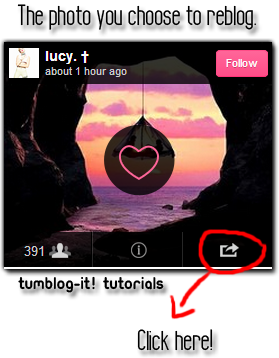
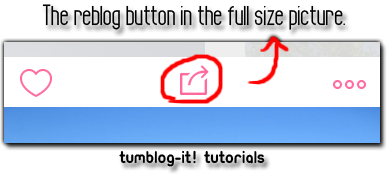
3. Click enter on your keyboard or the search button and a all the photos related to "landscape" (the word for this example) will appear.To re-blog a photo you like, click on the right-side icon (not in the heart) and a new window will open. It will ask you to choose between Facebook, Tumblr or Twitter. Choose Tumblr.

Too see the picture at the original size simply click directly on the photo.


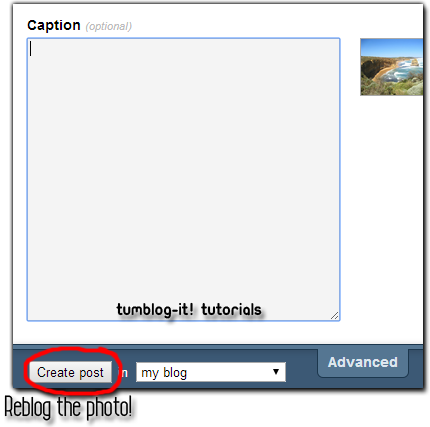
4. Once you choose to re-blog the photo on Tumblr a new window will open. Look at the bottom of the window and click on "Create Post". The photo will instantly upload in your Tumblr blog. Visit your Dashboard and the picture will be there.


Welcome to Tumblog-it! Backgrounds Library!


Hello Everyone! Imagine you like a background for your Tumblr blog, but can't find it again? Tumblog-it have created a full Library FREE of use for you. Discover all the backgrounds available! 

Click HERE to see the full Library!

HOW TO USE THE LIBRARY: 
1. Click on the arrow from the left-side column and you be able to see all the Backgrounds FREE for your Tumblr Blog!


2. So you want a background? What to do? Click on the background you wish and on the right-side of your screen find the LINKS available for the photo:


3. Click on the code, and it will automatically copy the code and paste it on your blog. 

Copyrights: We do not take any credit for any background FREE and public to use for Tumblr Users. If you're the owner of the background image and do not wish you publish it - send us a message HERE. With the category and description of your background.


Blue Backgrounds for your Tumblr Blog.

Have you been searching for blue backgrounds? Last time I posted more than +25 different DARK backgrounds, now is time for BLUE fun backgrounds.

These backgrounds are FREE and repeatable for your Tumblr blog. Tumblog-it! doesn't take any credit for this background. This backgrounds are free to use provide by different websites:


Right click and Save Picture As...

Right click and Save Picture As...

Right click and Save Picture As...

Right click and Save Picture As...

squares geometric lines snowflakes blue floral planets and stars Blue Abstract Vector Background  Technology Theme Background Vector  

Blue Floral Vector Background 

Pattern-maisen_large

Tumblr_m1jruxc1at1rrv3kuo1_400_large

Tumblr_lwgnq7vebu1r7b5n3o1_500_large

Tumblr_lkwr2jpxku1qf7n84o1_400_large

Tumblr_lv490jvnvs1r6me19o1_400_large

Tumblr_ltblosvc4b1r1tkcl_large

100+ Photoshop Backgrounds and Patterns in Shades of Blue

Blue-geo-free-photoshop-patterns

Diamonds-free-photoshop-patterns

X-free-photoshop-patterns