Showing posts with label reblog. Show all posts

New! Quick Features from Tumblr


Hello Everyone! If Log In Tumblr every day you may have notice some changes on the Quick Features that allows you to: Ignore someone, Share the post, Reply, Re-blog and Like the post. 

What's difference? The latest update from Tumblr change from top-to-bottom the Quick Features. Now you be able to find this option at the end of each post. I made a simple table of what each icon means:

= the "stop sign" means IGNORE the person who made the post.
= the SHARE button allows you to share the post by E-mail or Permalink.
= the REPLY button, you can share your comments if the author of the post allows it.
= everyone knows this one! is the famous RE-BLOG feature. 
= LIKE the post! If you have a favourite post you do not wish to forget, just click on the heart and it will go directly to your Likes List. Don't know how to find the List? We have a tutorial for you! Click HERE.
= this is your POST OPTIONS, it will appear after you post or queue a photo, text, quote, video, etc. The Post Options will allow you to EDIT or DELETE the post you just made. 


Tumblr Upgrade: The Reblog Option

Click on the photo to view larger.

Hello Everyone! On January 25, 2013 Tumblr Staff officially release their new upgrade that will allow users to have an easier and fun experience with Tumblr. Here's a quick image of how the Reblog works.

An upgrade, years in the making…
When we imagined Tumblr more than seven years ago, we dreamed of offering creators a new canvas. Every post would be a raw look through the author’s eyes and mind. We imagined the interface disappearing as these subjects came to life.

For years, this vision was challenged by limits in browser technology and an increasingly daunting set of Tumblr features to support. But today, we take a huge step.
After months of careful crafting, we’ve reduced creation on Tumblr to its essence, while carrying over every single feature and making room for some BIG new ones (like completely customizable drag-and-drop photoset creation, faster uploads, and inline reblogging!). We can’t wait for you to try it.

Ok, so what's new? 
• Faster Reblogging.
• A new Reblog settings that allows you to Custom the URL, content and date.
• Language (you be able to choose different languages now)
• The Strikethrough option for you paragraph. (Example)

The upgrades have started rolling out and will be available for everyone already. If you have any issues make sure to contact them at the Help Center.


Tutorial: How to Re-blog from We ♥ it!


What's We ♥ it? 
We ♥ it, is a website that allows you to collect your favourite images and share it with everyone (and is free)! including Tumblr. This website have become one of the best photo-search tool for many bloggers, and here's why, let me teach you "How to Re-blog from We ♥ it!"

1. FIRST you must know that:
- You must be log in your Tumblr Account.
- You don't need to sign up in We heart it.com to reblog photos/images.

2. Visit their website Weheartit.com and look for the Search option. Type any topic you wish to see, for example I will type "landscape".


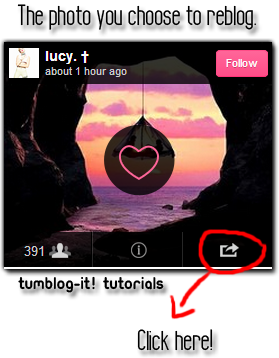
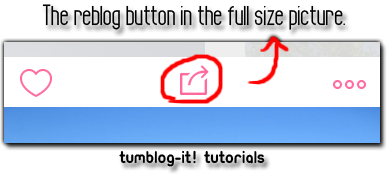
3. Click enter on your keyboard or the search button and a all the photos related to "landscape" (the word for this example) will appear.To re-blog a photo you like, click on the right-side icon (not in the heart) and a new window will open. It will ask you to choose between Facebook, Tumblr or Twitter. Choose Tumblr.

Too see the picture at the original size simply click directly on the photo.


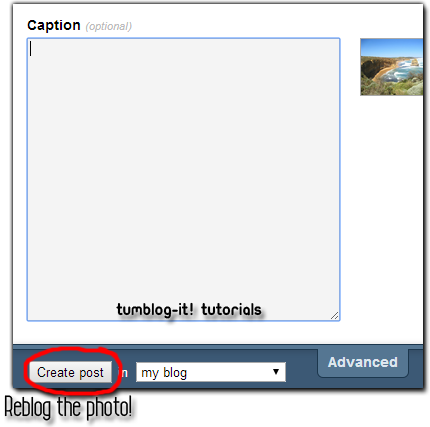
4. Once you choose to re-blog the photo on Tumblr a new window will open. Look at the bottom of the window and click on "Create Post". The photo will instantly upload in your Tumblr blog. Visit your Dashboard and the picture will be there.


Tutorial: How to Re-blog myself? Using Missing-E

Hello Everyone! If you wish to re-blog yourself (because Tumblr doesn't allow you to) I recommend you to install the add-on or extension Missing-E. On this tutorial I will show you how to Re-blog yourself using Missing-E.

If you want to know more about Missing-E or wish to install it please visit: Missing-E! The new Tumblr Experience!


Ok, let's start the tutorial. First you must have install Missing-E for chrome, Firefox or Internet Explorer.

1. Now depending on the browser you're using open the Missing-E extension.
Fore example if your using Chrome you'll go to
• Settings >> Extensions >> Options >> Post Features

If you're using FireFox:
• FireFox (top left corner) >> Add Ons >> Extensions

2. In Any browser that you're using (IE, Chrome, Firefox) Find the POST FEATURES option. Scroll all the way down and find the Reblog Yourself Option, make sure is all check marked.


3. Let's go to Tumblr now. Log in, and find the re-blog button on your Dashboard.  And there you have it, now you can re-blog yourself! thanks to Missing-E add-on.