Showing posts with label tutorials. Show all posts

Facebook and you!


Facebook is a well know social network, sharing and  building a closer relationship with your audience and customers. It is also a great idea to get more followers and let the world know about your blog! Don't know how to start using Facebook? Let me show you the Tumblog-it! Facebook Tutorials, learn and share your Tumblr blog with friends, family and everyone else!


1. How to Make a Facebook Page for your Tumblr Blog: Create a Facebook Page to build a closer relationship with your audience and customers. People who like your Page will get updates from your blog (if you post any photos, news, comments, quotes, etc)  on their Facebook news feeds.

2. Tutorial: Add a Like Button from Facebook: Add a LIKE BUTTON to your Tumblr!  What's a Like Button? Let people share pages and content from your site back to their Facebook profile with one click, so all their friends can read them.

3. How to share your Tumblr Posts on Facebook: Tumblr interface now let's you interact and update your Facebook Page with your Tumblr account.

→→→ What is this? Now every time you post a text, photo, video, quote, link or audio on your Tumblr, it will automatic  send a "copy" of your work to FB (facebook).

4. Looking for more Facebook Options? Facebook offers Social Plugins (such as Like Button, Share Button, Comments, Follow Button and much more) and Facebook Badges, another easy way to connect people to your blog.


Your Interface: Show Notifications, Endless Scrolling and Share your Posts


Hello Everyone! Have you visit your User Interface? The user interface for the Dashboard, allows you to:

  • Show Notifications: Find out when you have new followers and when your posts have been liked, reblogged, or replied to.
  • Show real-time notifications from people you follow
  • Enable endless scrolling
  • Show unread message count
  • Find out when you have new messages (Asks, Fan Mail, Submissions).

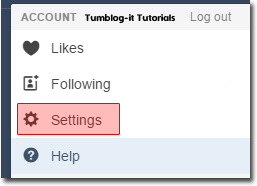
1. To find you Dashboard Interface, on the top right-corner find the Settings. 

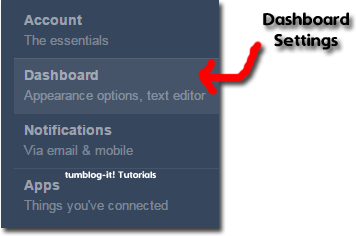
2. Find where its says Dashboard (appearance options, text editor) and click on it. A new window with the Dashboard options will appear. Select ON/OFF the options you want. Tumblr will auto save your choice.


Tutorial: How to add "Read More" when Replying / Answering someone

Hello Everyone! I made a tutorial that allows you to add the option "Read More" when creating a Post of any type (photo, text, quote, etc) but what happens when you have to Reply or Answer someone who writes you a private message. Where is the "Read More" option? There's none!

Let me teach you how to add the "Read More" when Replying or Answering someone.


• First you must be Log in you Tumblr Account.
• On your Dashboard find the INBOX button on the top corner of the Tumblr page and click on it.


• Once you open the message, you'll notice there's no "Read More" or "Page Break" icon. What to do?
1. Type your paragraph. Add a photo and do everything normal. Now when you want to add the "read more" find the HTML option, like in the following photo:


2. Where you want to add the "read more" add the following code: <p>[[MORE]]</p>


3. Now click on the UPDATE at the end of the window.
4. Now on the message window you'll see the "Read More" option. Like the photo below: Click on Publish and you're done!


Tutorial Widgets available for your Tumblr Blog!

Want to make your blog different and original from the others  Try our Tutorial-List of the widgets / tools we  have for you!
Free modern-style Users Online Counter
• Create a Poll have never been so easy!
• Change the cursor of your blog! It's easy!
• Add a Friendsbilly FREE Music Player
• Over + 25 Mini-Animations to use
• Install a Favicon on your Tumblr Blog!
• Free Flag Counters for Tumblr
• How to add a Clock to your Tumblr Blog
• Free Hit Counter for Tumblr
.. more!

Searching for more tricks, widgets and tools? Visit our Widget Option or the Full Tutorial List available on Tumblog-it!

Youtube best Tumblr Videos! ++ Must Watch. And a Tumblr Musical Video?

Here's the best Youtube related to Tumblr: From tutorials, tricks, tips and websites that will  help you create a great Tumblr Blog! 

#1 How to use Tumblr (basics)
In this tutorial, I'll be going through the basics of setting up a Tumblr blog. There's a lot of different ways to get started blogging - the choices available to you are actually quite mindboggling. But if you're looking for an extremely simple way to start a blog, or if you're just interested in consolidating the content you post from other sources, Tumblr is an easy to use platform to handle it. [credit: thoughtshots]


#2 How to change your avatar image on Tumblr


#3 Tutorial: How to Make a Tumblr
This tutorial covers how to sign up for tumblr. This tutorial was made for a project at Rowan University for the course Informational Architecture. [credit: tumblrtutorials]


#4 FOR FUN
Tumblr: The Musical