Showing posts with label app. Show all posts

Tumblr App Update!

Hello Everyone! On May 6, 2014 Tumblr announced a new option: to customize your blog in the mobile application. Here's the full notes:
"A thing you’d love to do: customize the way your blog looks in the Tumblr mobile apps. Now you can do that. A header image, a multitude of fonts, an infinity of colors. A bunch of other things. You’d discover 3.3 billion combinations if you were foolish enough to count them. 
Better still: the choices you make will apply to your appearance in the Dashboard. Hover over an avatar. Now look. See? The beauty of a blog is delighting your eyes. 
Get the new app (iOS, Android), or visit the Settings page from your Dashboard, and make yourself as beautiful as you possibly can. Or make yourself look like a weirdo. Whatever you want. It’s not up to us. Have fun." - Tumblr Staff


Android App: Know the basics and FAQ


Hello Everyone! Welcome to Know the basics on your Tumblr App for Android devices (tablet or cellphone). For this tutorial, I explain the "icons" on your main page.

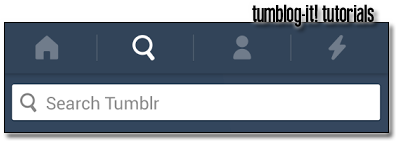
1. After you download the app you notice the 4-top-buttons on your tablet or phone.
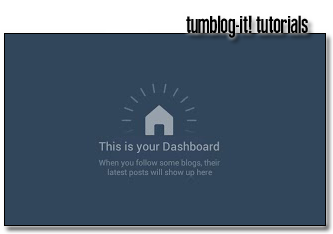
→ Home (the house icon) This is your Dashboard, your home page in Tumblr. This will show you the posts, re-blogs, quotes, links, videos and photos.

→ Search icon allows you to find anything in Tumblr. From blogs, people or posts.

→ The third option looks like a "human icon" this is your Likes, Following List (the blogs you follow) and settings options. 

→ The four option (lighting icon) is your info-panel. It displays the people who re-blogs, follows or likes your posts and your Tumblr blog. This option is automatic and it keeps track of your followers. For example if someone joins your blog or likes post - this panel will display it.

2. Frequently Asked Questions from our Tumblog-it! Community
How to Log in?
→ Log in your Dashboard (homepage) on the bottom of the screen says "Log in".

I am new to Tumblr, how can I Sign up (make a new account)?
→ To make a new account visit the Settings Option
→ And click where it says "Sign up and get more"
→ Type your account + password and you'll have a Tumblr account.

How to Log off your Tumblr Android App?
→ Visit your Settings Option  and click on "Settings"
→ At the end of the screen find the "Log out option" and click.

How to find my LIKES, blogs I FOLLOW and my OTHER TUMBLR BLOGS?
→ This three options are available on your Settings Option